

A reseller recently asked me to clarify the impact of Hyper-Threading, and I thought it would be helpful to
document my explanation.
When running SQL Server in a virtualised environment, licensing can be complex, especially when
hyper-threading is enabled. This article explains how Microsoft’s licensing rules apply to virtual cores
(vCPUs) and hardware threads, helping clients of The SAM Club stay compliant.
Key Terms
• Hardware Thread: The execution path provided by a physical processor core. With hyper-threading,
each physical core exposes two hardware threads (logical processors).
• Virtual Core (vCPU): A virtual processor assigned to a virtual machine (VM). The hypervisor maps
vCPUs to hardware threads.
• Mapping: How vCPUs are scheduled to run on hardware threads. A vCPU may be pinned to one
hardware thread or allowed to float across multiple threads.
Licensing Rule
Microsoft states:
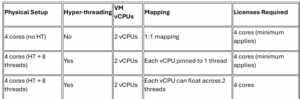
“If any Virtual Core is at any time mapped to more than one Hardware Thread, Customer needs a License
for each Hardware Thread to which it is mapped.”
What This Means
• If a vCPU is tied to one hardware thread, you need one SQL Server license for that thread.
• If a vCPU can run on two hardware threads (due to hyper-threading), you must license both
threads.
• In practice, you must license every hardware thread that a VM’s vCPU can touch, not just the
vCPU count.
Example Scenarios

Hyper-Threading in Azure
Is Hyper-Threading Enabled?
Yes — hyper-threading is enabled by default on many Azure VM families. Microsoft’s general-purpose and compute-optimised VM series (such as Dv4/Dsv4, Ev4, and Fsv2) run on Intel Xeon processors that support Intel Hyper-Threading Technology, so each physical core presents two logical processors to the VM.
How Azure Presents vCPUs
• Azure vCPUs are hardware threads, not physical cores.
• A VM advertised with 8 vCPUs is mapped to 8 hardware threads.
• Licensing in Azure is therefore based directly on vCPUs.
Can Hyper-Threading Be Disabled?
• Azure does not expose BIOS-level controls to disable hyper-threading.
• Customers generally cannot disable it at the hardware level, though OS-level workarounds exist.
Licensing Implications in Azure
• Because vCPUs = hardware threads, SQL Server licensing in Azure is straightforward: license each
vCPU.
• The same minimum of 4 core licenses per VM applies.
Summary
• Always license hardware threads, not just vCPUs.
• Minimum of 4 core licenses per VM applies.
• Hyper-threading can double licensing requirements if vCPUs aren’t pinned.
• In Azure, vCPUs already represent hardware threads, so licensing is based on vCPU count.
• Enterprise edition doesn’t reduce license count — it only expands features.