
Most organisations can answer one Microsoft 365 question with confidence: how many licences did we buy? Far fewer can answer the questions that actually matter — who is paying for a licence on an account that has been blocked for months, which accounts have two licences where one is entirely redundant, and how many premium add-ons are sitting idle going into the next renewal.
The SAM Club M365 Audit turns the exports already available in your Microsoft Admin Centre and Entra ID portal into a single Excel workbook that answers all of those questions — and surfaces the security and compliance risks that most organisations do not know they have.
The examples below are drawn from a real audit run in August 2026 for a 1,578-user organisation. Here is what the report looks like in practice with fictional names used.
The one-page view that tells the whole story
The report opens on a Summary sheet — total licensed accounts, every savings opportunity with its monthly and annual cost, security findings, and compliance flags, all in one place. It is the page built to be shared with a finance director or IT manager before anything else is opened.
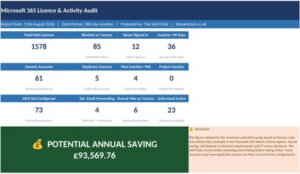
Summary sheet: every finding across all report categories with costs and recommended actions.
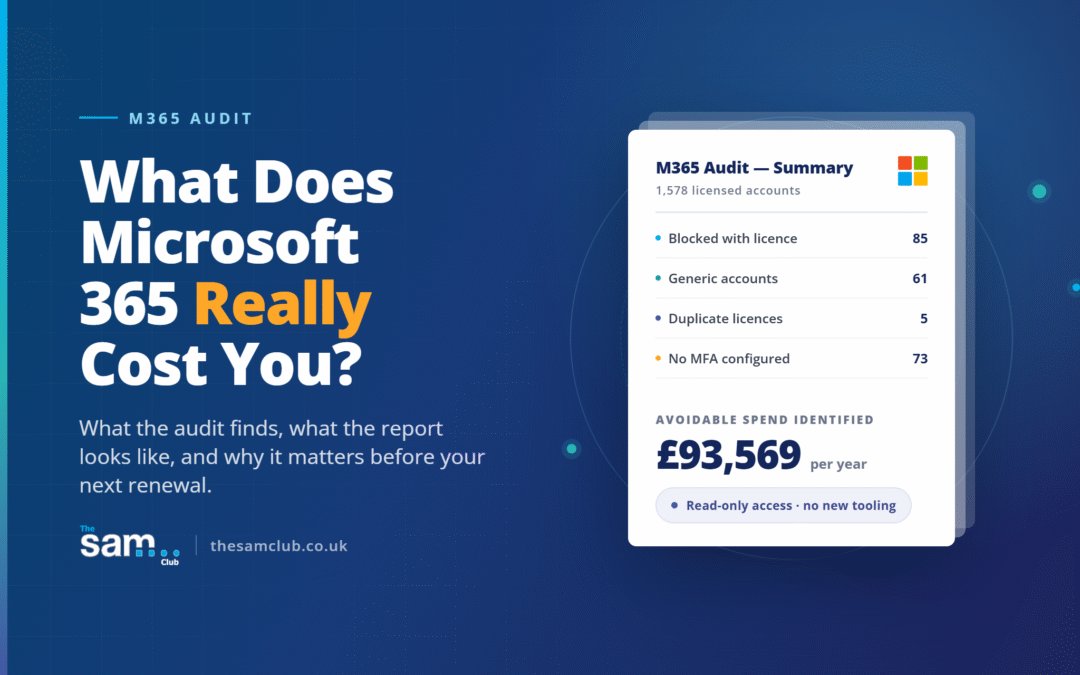
In this example the audit identified £93,569 of avoidable annual spend across 1,578 users. Eighty-five blocked accounts were still holding paid licences. Seventy-three licensed accounts had no MFA configured. All of this surfaced in a single view before the reader opened any other sheet.
Where the money is going — and where it can be recovered
The Savings Analysis sheet breaks the total saving down by category — blocked accounts, never signed in, duplicates, inactive accounts, and generic accounts — with the number of accounts affected, the monthly saving, the annual saving, and a priority level for each.
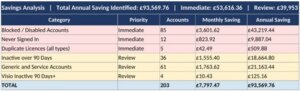
Savings Analysis: every savings category costed individually with priority flags.
Priority is set at two levels. Immediate means the action is unambiguous and risk-free — a blocked account once archived can have the licence removed or a lessor licence assigned whilst email is monitored. Review means the account needs to be reviewed to determine the action before the next renewal.
Paying for accounts nobody can use
When someone leaves or is suspended, their account is blocked in Microsoft 365. What is routinely missed is that the licence stays assigned — and Microsoft continues charging for it. In this example, 85 blocked accounts were still holding paid licences — including accounts with M365 E5 at £38.66 per month and accounts with E5 plus Copilot at £68.66 per month.
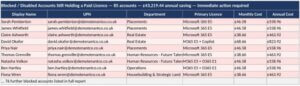
Blocked with Licence: 85 blocked accounts still paying — £43,219 annual saving available immediately.
The total annual saving from this category alone was £43,219. Every one of these accounts was a former employee whose IT access had been correctly blocked — but whose licence had never been removed.
The redundant licences hiding in plain sight
Duplicate licence assignments are the finding that surprises clients most consistently. In this audit, five accounts were found with redundant licence combinations — three users with Power BI Pro assigned alongside M365 E5 (E5 already includes Power BI Pro), one with Office 365 E3 alongside M365 E5, and one with Exchange Online Plan 1 alongside M365 E5.

Duplicate Licences: five redundant licence combinations identified automatically.
The report detects 22 specific duplicate combinations automatically. Each finding shows the exact redundant licence, the monthly and annual saving, and the action to take.
The security risk hiding in your licensed accounts
Every licensed account is checked against the Entra ID authentication methods registration report. The MFA Not Configured sheet lists every active, non-blocked licensed account with no MFA set up — sorted by days since last sign-in, with the highest-risk accounts at the top.
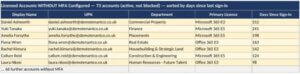
MFA Not Configured: 73 active licensed accounts with no MFA — sorted by days since last sign-in.
Seventy-three accounts without MFA across 1,578 users. The highest-risk account had not signed in for 312 days — and had no MFA in place throughout. An account without MFA is one convincing phishing email away from a full credential compromise.
The accounts nobody noticed were still paying
Service accounts, shared inboxes, admin accounts, meeting room accounts, and test accounts routinely accumulate expensive user licences they do not need. In this example, 61 generic accounts were identified — including three admin accounts each holding a Microsoft 365 E5 licence at £38.66 per month.
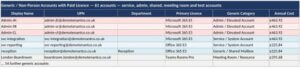
Generic Accounts: 61 service, admin, shared and test accounts with paid licences — categorised automatically.
The report automatically classifies every account. Admin accounts, service accounts, shared mailboxes, meeting room accounts, and test accounts are each flagged separately so IT can review and act on each category appropriately.
Premium licences going to waste before renewal
Visio Plan 2, Project Plan 3, and Microsoft 365 Copilot are premium licences that cost significantly more than the base suite. The Visio Licence Usage sheet cross-references every Visio holder against actual activity data, flagging holders with no activity in the past 90 days.
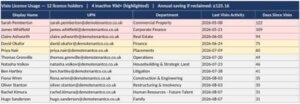
Visio Licence Usage: 12 licence holders — 4 inactive 90d+ highlighted — review before renewal.
Four of twelve Visio holders had not used Visio in over 90 days — with the most inactive showing 122 days since last activity. The annual saving from reclaiming those four licences was £125.16. Identified before renewal, this is an immediate and risk-free action.
And much more besides
The sheets above are a selection of what the report covers. The full workbook also includes:
Email forwarding rules — external forwarding flagged as HIGH risk, a common indicator of a compromised account
Shared mailboxes with paid licences — shared mailboxes holding unnecessary paid user licences
E5 tenant-level feature compliance — non-E5 users in tenants with E5 licences who may be using E5 security features without a licence
OneDrive and mailbox capacity, Teams inactive users, guest accounts, device registration, password expiry, and ProPlus app usage
Find out what is in your tenant
None of this requires new tooling, a new licence, or data from anywhere outside Microsoft 365 itself. We need a read-only account in your Microsoft Admin Portal — Global Reader and Report Reader roles — and GDPR data processing agreements in place before we begin.
Find out more about the M365 Audit — The SAM Club
Contact The SAM Club to arrange your audit
Email: info@thesamclub.co.uk